
Xactimate's 2026 AI Update with XactAI Tools
Xactimate added new AI tools in 2026. Does that mean you can upload roof photos, press one button, and receive a complete, accurate estimate?
No.
The updates can save time, improve organization, and help estimators find information faster. But they do not replace measurements, construction knowledge, line-item review, or professional judgment. Used carefully, they are helpful assistants. Used carelessly, they can make an incorrect estimate look polished.
Here’s what changed, what didn’t, and what roofing contractors should verify before relying on AI features.
What did XactAI actually launch?
Xactimate’s AI-generated photo labels and descriptions were introduced in October 2025, not 2026. That feature remains relevant this year, but it does not automatically convert roof photos into every line item required for an estimate.
What actually changed in 2026:
- XactAI Line Item Advisor (April 2026): The new AI estimating feature. It works from written prompts. You describe what you are looking for, and Xactimate suggests up to three possible line-item matches.
- Expanded labor-efficiency settings (March 2026): A major non-AI pricing update. It can affect unit pricing, so estimators need to understand it just as carefully as the AI features.
XactAI AI-Generated Photo Descriptions
How It Works
When XactAI is enabled, it can create names and descriptions for photos that don’t already have them. The photos must be placed in a specific room or folder. If they remain in the Unassigned folder, the feature does not start.
Once the text is generated, it appears in an AI Review area. The estimator must approve or edit it. ‘s documentation says unapproved AI text is hidden when the project is completed. Approved text is associated with the person who approved it and the approval date.
Why the Review Step Matters
That review requirement is not a formality. It is the control that keeps the estimator responsible for the file.
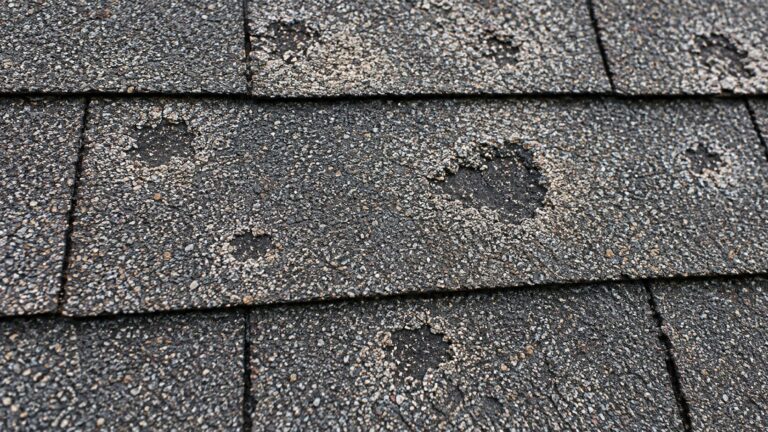
Imagine a close-up photograph of a shingle with a dark mark. AI might create a general label, but the image alone may not establish the roof slope, exact location, component, measurement, functionality, or cause of the condition. A useful description should remain limited to what the photograph and field notes actually support.
Instead of accepting a vague phrase like “damaged roof,” identify the visible component and location. If the facts support it, a better description might say, “West slope, architectural shingle, marked surface condition, close-up view.” Do not let automated wording declare hail damage, wind damage, code applicability, or required replacement unless qualified evidence and professional review support that statement.
The feature can reduce repetitive typing across a large photo set. It can also make folders easier to review. But it cannot rescue a poor inspection. A blurry close-up with no location context is still weak evidence, even when AI gives it a confident description.
XactAI Line Item Advisor
What It Does
The advisor appears in the Estimate Assistant drawer when XactAI is enabled. An estimator can ask a question, describe an operation, enter keywords, or continue a conversation by adding more detail. Xactimate then returns two or three possible matches. You can inspect the Cat and selector, choose the applicable room, and apply the selected item to the estimate.
For example, an estimator might ask for an item involving replacement of roof flashing. If the first suggestions are too broad, the estimator can clarify the flashing type, material, or location. That is faster than guessing among similar selectors, especially for someone still learning the database.
What It Doesn’t Do
The official limitations are important. The advisor does not:
- Provide detailed material-and-labor pricing breakdowns
- Identify every item required for the described job
- Provide brand-specific comparisons
- Supply pricing determined by other companies or products
In practical terms, the advisor helps you search. It does not scope the entire roof. It does not know the measured ridge length, starter quantity, waste calculation, number of pipe boots, actual flashing condition, adopted code, manufacturer instructions, or what production may reveal beneath the shingles. It also does not decide causation or insurance coverage.
Review Every Suggestion Like a Manual Pick
After applying a suggestion, review it exactly as you would review an item found manually. Confirm the category and selector. Check the activity code. Read the item description and components. Verify the unit, quantity, price-list market, and price-list date. Add a concise note when the operation needs explanation. Then connect it to the measurement, photograph, report, invoice, or other supporting document.
AI can make the search faster. It cannot make the selected item correct. That matters most when several similar selectors appear, because a small difference in activity, material grade, or included components can change both meaning and calculated price significantly.
The Labor-Efficiency Update: Not AI, But It Can Change Your Totals
The Three Options
Previously, Xactimate generally distinguished between ordinary restoration or remodeling work and a New Construction setting. The expanded system provides three choices:
- Restoration, Remodel, or Service: Remains the default and is intended for most estimates. It reflects work on existing finished structures where occupants, coordinated deliveries, restricted access, matching existing finishes, and normal restoration complications can reduce productivity.
- Large Restoration or Remodel: The new middle option. Verisk describes it as appropriate for larger projects with good worker access, work areas separated from adjacent finished spaces, minimal delivery obstacles, and little or no interference from occupants. Its labor assumptions and related unit pricing fall between the default restoration model and the most efficient total-rebuild model.
- Total Rebuild or Similar: Replaces the former New Construction selection. It reflects ground-up construction or comparable conditions with open access, freely scheduled work, large quantities, and the highest labor productivity assumptions.
Choose Based on Conditions, Not the Number You Want
The important word is conditions.
A project should not receive the Large Restoration setting merely because the total is high or the roof contains many squares. A complete roof replacement on an occupied home can still involve landscaping protection, limited staging, steep access, small work areas, coordinated deliveries, and existing components that must remain protected.
Likewise, an unusually large, open, accessible project may have efficiencies that a smaller residential repair does not. The estimator must evaluate quantity, accessibility, occupancy, scheduling, environment, and the way new work connects to existing work.
Do not choose an efficiency model because it produces the number you want. Choose the model that best matches the documented job conditions.
Compatibility Rules
Verisk says the expanded options require Xactimate version 2026.2.1000.1 or later and a compatible newer price list. Older price lists will not offer the Large Restoration option. Users running older Xactimate versions may be unable to open a project when that option is selected.
That means contractors comparing two estimates should check the labor model, not just the visible line items. Two files can contain identical quantities and selectors while producing different prices because their parameters differ.
A Practical 2026 Quality-Control Workflow
- Update Xactimate and confirm XactAI access. XactAI is an additional suite that must be added to the applicable instance and profile; access should not be assumed.
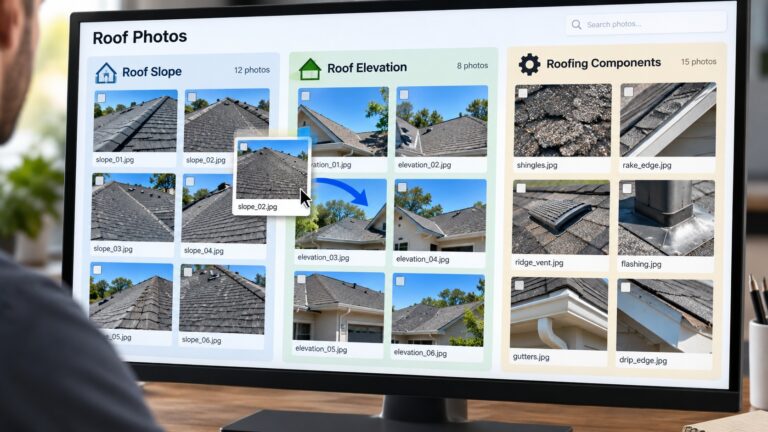
- Organize photos before generating descriptions. Sort by roof slope, elevation, room, or component. AI performs better within a disciplined file structure, and reviewers need location context.
- Review every generated photo name and description. Delete assumptions, correct locations, and preserve only observable, supportable facts.
- Use Line Item Advisor as a search assistant. Write a specific prompt, review all suggested options, and inspect the selected item before applying it. Never assume the first result is the correct one.
- Verify the labor-efficiency setting under Claim Info, Parameters, and Pricing. Record why the selected model matches the project conditions, especially when it is not the default.
- Complete a human review of the entire estimate. Recheck measurements, waste, activities, components, notes, taxes, pricing date, photos, attachments, and totals. AI output should enter the same quality-control process as manually written work.
What This Means for Supplements
For roofing contractors, the larger lesson is simple. These tools may reduce administrative time, but they do not change the standard for a defensible supplement. Every requested item still needs a legitimate construction basis and clear support.
A supplement cannot create coverage, remove a deductible, change actual-cash-value terms into replacement-cost terms, or guarantee approval. The carrier determines coverage under the policy.
State laws vary. Contractors should not interpret coverage for homeowners, negotiate insurance settlements, or act as public adjusters unless they are properly licensed and legally permitted to do so.
About American Roof Supplements
American Roof Supplements is not a public-adjusting company. We prepare professional residential Xactimate estimates, supplements, and supporting documentation for roofing contractors. Our role is to make legitimate construction scope accurate, organized, and review-ready.
If paperwork is taking time away from sales and production, here’s how our pricing works:
- First estimate or supplement: Free for first-time clients
- Residential Xactimate estimate (prepared before the adjuster meeting): $50
- Follow-up supplement (if we prepared the estimate and the job is approved): $100
- Standalone supplement: $150
We charge no monthly fee and no minimum number of jobs. Every qualifying job includes our 72-hour turnaround guarantee, excluding Sundays and major holidays, or the service is free. Reasonable revisions are included at no additional charge.
Schedule through our booking widget, or call or text American Roof Supplements at 469-515-8435. We will review the claim information, tell you exactly what we need, and walk you through the next steps. Newer contractors can also call during their first five claims before speaking with the insurance company so they can prepare for the conversation and understand what the carrier may request.
If this breakdown helped, share it with your roofing WhatsApp group, Facebook group, or your team.
The Bottom Line
Use AI to move faster, not to skip the work. Verify the photo. Verify the line item. Verify the labor model. Support the scope. And make sure a knowledgeable human remains responsible for the final estimate.
FAQs:
How does XactAI integrate with existing systems?
XactAI uses artificial intelligence to automate tasks such as labeling inspection photos, summarizing claim notes, and recommending estimating line items. It works within existing Xactimate tools to reduce manual data entry and speed up roofing estimates. Contractors can review, edit, and approve AI-generated information before finalizing their estimates.
How quickly can I start using XactAI after enrolling?
You can start using XactAI as soon as you purchase the separate XactAI subscription and activate your license. Once your administrator enables access, the features become available the next time you open or sync Xactimate. No lengthy setup process is required.
Does XactAI require any special hardware or software?
No special hardware or separate software installation is required for standard XactAI features. You need a device that meets Xactimate’s system requirements, an active Xactimate subscription, and an XactAI license. Once your license is activated, you can access the available AI features within Xactimate.